Choosing and deploying device fingerprinting APIs
The complete guide to collection, persistence, integration, response, costs, scope, buyer checks and false matches. Follow the task-specific articles when you need a deeper implementation or evaluation plan.
How Does Device Fingerprinting Work?
Device fingerprinting works by reading many small attributes of a browser or device, such as screen, fonts, graphics rendering, audio stack, hardware concurrency, and time zone, then using that evidence to distinguish returning environments. Matching quality depends on the available signals, the identifier scope and the product’s matching method; a server-side service can compare new evidence with history.
- Why collection happens in the browser: a JavaScript agent can read rendering and hardware attributes that never appear in an HTTP request.
- Why matching happens on the server: a backend compares the new reading with stored history and tolerates small drift, such as a browser update, instead of issuing a new ID.
- Why network data is added: IP, connection type, and TLS characteristics add another source of evidence to compare with the browser reading. These signals have their own collection limits and should be checked together.
- Why collisions matter: two identical laptops from one corporate fleet can produce near-identical readings, so a careful matcher prefers a missed link over merging two real people.
The tool's shape decides how much of this it does: an open-source library stops at the browser reading, while hosted APIs add server matching, history, and network evidence. The steps below turn these layers into a detection workflow.
How to Detect Returning Devices with Device Fingerprinting
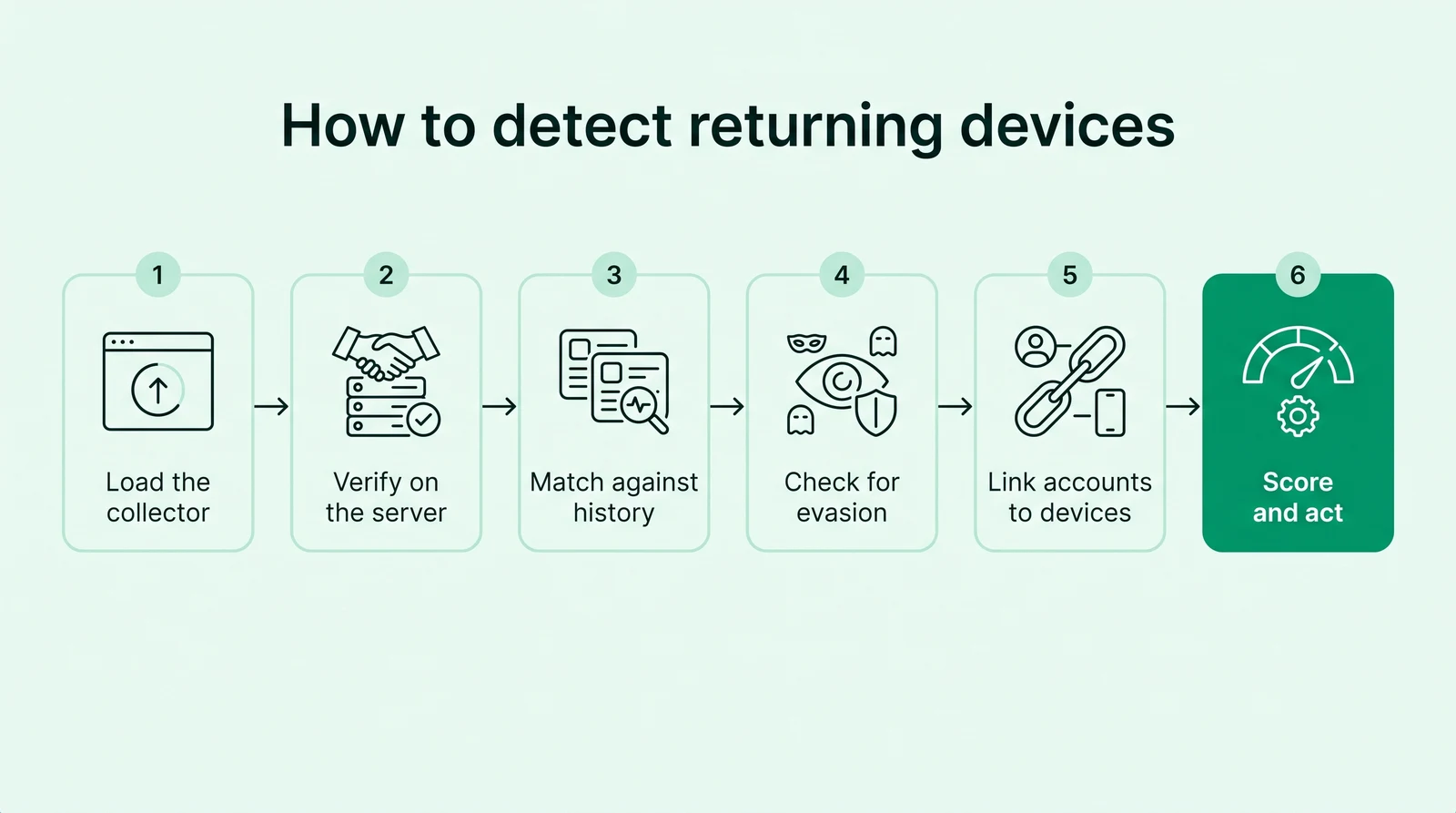
To detect returning devices, load a fingerprinting script on sensitive pages, verify the identifier on your server, and match it against earlier visits, then evaluate recognition after cleared cookies, incognito or a new IP against the chosen identifier scope. Then add evasion and network signals, link accounts to devices, and act on one risk score.
- Load the collector. Add a JavaScript agent to signup, login, and checkout pages so it reads browser and hardware attributes on each sensitive request.
- Verify on the server. Send the request ID to your backend and fetch the identifier server-side, so a tampered or replayed client value is never trusted.
- Match against history. Compare the identifier with earlier visits to evaluate recognition after cleared cookies, incognito windows and IP changes within the provider’s supported scope.
- Check for evasion. Flag headless browsers, virtual machines, anti-detect profiles, and VPN or proxy exits that try to disguise the device.
- Link accounts to devices. Count how many accounts, signups, and logins share one device to expose multi-accounting and shared credentials.
- Score and act. Combine the evidence into one risk score with named reasons, then allow low risk, step up medium risk, and review or block high risk.
Test genuinely different similar devices too. See recognizing returning visitors without cookies.
How Do You Integrate a Device Fingerprinting API?
You integrate a device fingerprinting API in two halves: a JavaScript agent on the pages where risk decisions happen, and a backend verification step using the selected provider’s event, session or result contract. Keeping the decision on the server matters, because any value the browser sends on its own can be replayed or edited.
- Where to load it: signup, login, password reset, checkout, and promotion redemption, rather than every page view.
- How to read the result: pass the request ID to your backend, fetch the identifier and signals from the vendor API or a webhook, and store them with the account event.
- How to handle blocked collection: decide in advance what happens when an ad blocker stops the agent, such as a step-up check instead of a silent pass.
- How to handle timeouts: choose fail-open with logging or fail-closed with a challenge, and keep the raw response with each decision so reviewers can see why a device was flagged.
Use the client/server integration guide to define result verification, event binding, retries and failure behavior for the selected provider.
What Should You Do When a Device Is Flagged?
When a device is flagged, match the action to the risk level and to the checkpoint instead of blocking on the identifier alone. A returning device is not suspicious by itself; what matters is whether it links to many accounts, hides behind evasion tools, or behaves unlike its own history.
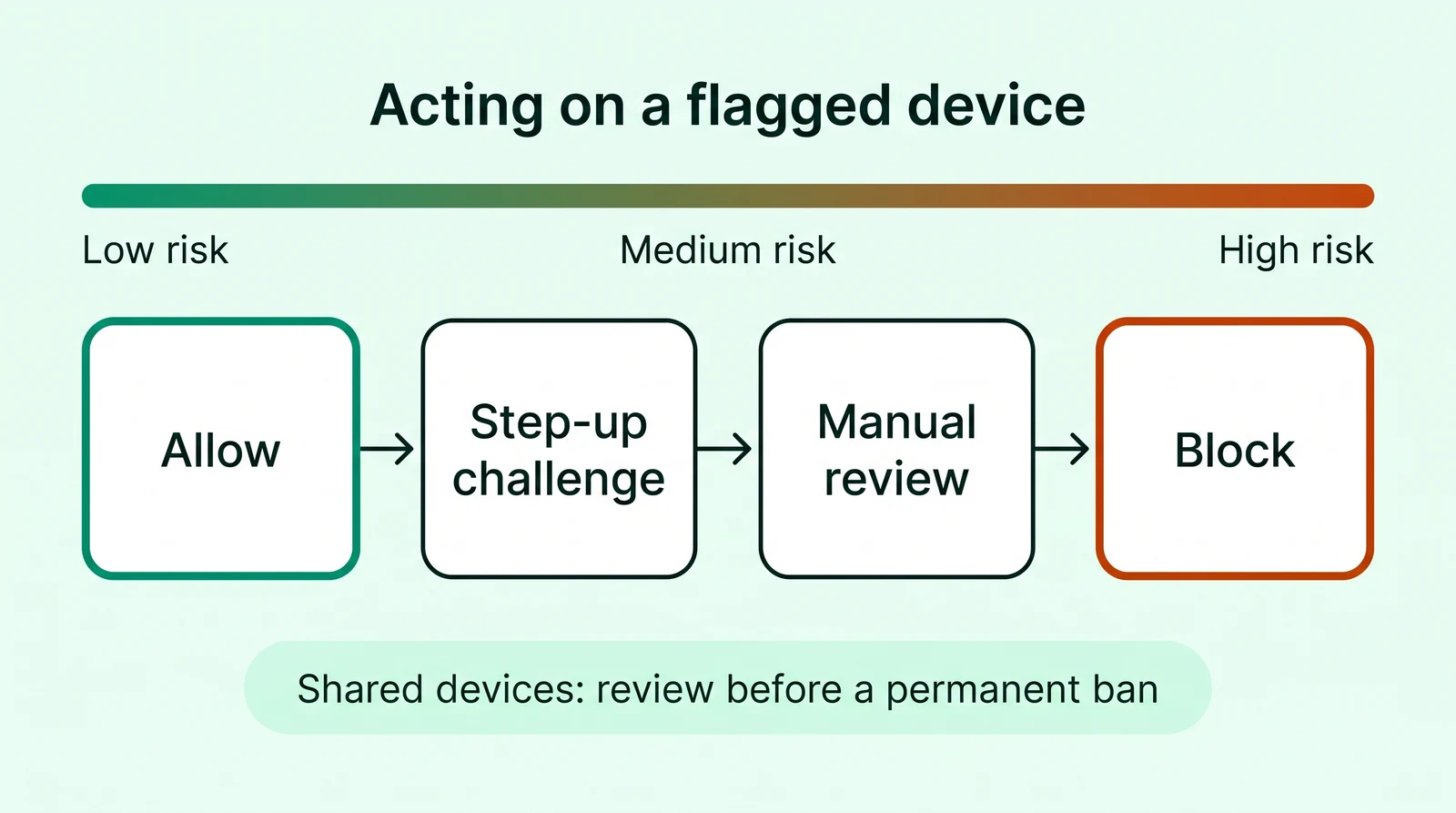
- Low risk: allow with no added friction and keep the identifier for later linking.
- Medium risk: step up with email or phone verification at signup, a second factor at login, or 3-D Secure at checkout.
- High risk from one signal: hold for manual review, especially when the only evidence is a network change.
- High risk with corroboration: block, or force a password reset, when corroborated activity shows account abuse or repeated evasion at a sensitive checkpoint.
Keep an appeal path. Shared family computers, library terminals, and corporate fleets of identical laptops can legitimately link several accounts to one device, so review before a permanent ban.
How Much Does a Device Fingerprinting API Cost at Your Volume?
Estimate the billable actions on each protected route. Identification calls, Risk API calls, fraud checks and monthly users are different units. Confirm the feature scope, period, allowance and behavior at the limit.
| API | Free access | Paid terms |
|---|---|---|
| ShieldLabs | 5,000 free identifications, API access and no card | 99 US dollars per month for 25,000 identifications; 79 US dollars per month billed yearly Vendor access page |
| Fingerprint | Up to 1,000 monthly identification calls; separate 14-day Pro Plus trial. Android allowances differ. | Pro Plus: 99 US dollars per month for 20,000 API calls, then 4 US dollars per 1,000 additional calls Vendor access page |
| SEON | Request-based free trial; confirm feature scope | Starter: 699 US dollars per month for 2,500 fraud checks; Premium custom Vendor access page |
| Castle | 5 US dollars monthly API credit: 1,000 Risk calls or 5,000 IP lookups | Pro: 200 US dollars monthly API credit; equivalent to 40,000 Risk calls. Enterprise from 4,000 per month Vendor access page |
| IPQualityScore | 1,000 free-lookups offer; device-product entitlement must be confirmed | Confirm current device-product pricing and allowance with IPQS; general lookup offers are not proof of device access Vendor access page |
| Verisoul | Demo and evaluation terms by request | Current /pricing route redirects to a demo request; confirm pricing, MAU basis and API entitlement Vendor access page |
| LexisNexis ThreatMetrix | Assisted evaluation; no public self-serve free plan established | Sales-quoted platform and implementation terms Vendor access page |
| Sift | Confirm evaluation and separate product entitlement with sales | Sales-quoted; confirm Device Fingerprinting API separately from machine-learning products Vendor access page |
| Incognia | Vendor-scoped Proof of Value evaluation | Volume-based pricing by MAU or API calls; Essential, Advanced and Premium scopes Vendor access page |
| FingerprintJS (open source) | Library available to self-host; check the deployed version’s license | No hosted identification fee; include integration, hosting and maintenance Vendor access page |
Include collection, server integration and investigation effort. The free API and cost guide separates allowances from trials and self-hosting.
What should buyers watch as browsers and identity APIs change?
Browser privacy behavior, storage partitioning, API changes and SDK updates can alter available evidence and matching behavior. Test ordinary updates and missing signals instead of assuming an unchanged client hash will remain stable indefinitely.
Current products distinguish browser, app, device and account context differently. Confirm supported surfaces, identifier scope, API versions and privacy/retention requirements in the proposed integration. Audio and rendering signals are inputs to evaluate alongside other evidence.
Read the identity-scope guide and browser audio guide for focused evaluation questions.
Which Device Fingerprinting API Fits Which Scenario?
Choose the output, collection surface and operating model required by the application. Use the alternatives to separate dedicated identification from broader fraud workflows and self-hosted code.
- ShieldLabs: Teams protecting signup, login and checkout that need persistent identification, explained risk and account-level abuse detection with self-serve access.
- Fingerprint: Teams wanting a dedicated identification service across web and native mobile, with Smart Signals and server event access.
- SEON: Fraud teams combining device identifiers with email, phone and IP enrichment, platform workflows and case-management requirements.
- Castle: Developers combining device identification and ready-made abuse scores with product-specific policies and event workflows.
- IPQualityScore: Teams combining a device product with IP, email or phone fraud intelligence, after confirming the exact device entitlement.
- Verisoul: Teams prioritizing duplicate-account, bot and fake-account prevention with a managed account-risk workflow.
- LexisNexis ThreatMetrix: Organizations procuring a networked digital-identity platform and integrating it into established fraud operations.
- Sift: Teams already evaluating Sift’s fraud platform that also require its separately documented device/session API.
- Incognia: Teams needing web/mobile identity and tamper evidence, with location intelligence where it matches the workflow and selected plan.
- FingerprintJS (open source): Teams needing a transparent browser-library baseline and willing to operate matching, storage and any risk enrichment separately.
What Should You Verify Before Buying a Device Fingerprinting API?
Before buying, verify persistence, collision rate, tamper resistance, the signals that arrive with the identifier, latency, documentation, privacy controls, and free-tier terms. Run a week of your own traffic through the top two or three candidates rather than trusting a demo, because published accuracy figures can use different populations, definitions and denominators.
- Does the ID survive cookie purges and private windows? Clear cookies, switch to incognito and private windows, and check recognition against the scope your application requires.
- Does it merge different devices? Run two identically configured machines side by side and count false merges.
- Can a tampered client forge it? Replay a captured payload and check whether the server still accepts it.
- What arrives with the ID? Count the risk signals delivered in the same response versus the ones you would assemble yourself.
- How fast is it? Measure latency inside the real login and checkout path, not in a sandbox.
- Are the docs public? Read them before any sales call and confirm a sandbox or free key exists.
- How is data handled? Ask about retention, consent support, and where identifiers are processed.
- What does free mean? Check the allowance period and reset conditions and whether a card is required.
How Do You Measure False Matches When a Device ID Links Accounts?
A device ID that links accounts is only as useful as its links are correct. Sample the linked groups themselves rather than the IDs, and check each link against facts you trust, so you learn how often two different people were tied together by mistake.
- Pull a sample of linked account groups. Take groups of different sizes from the API or the dashboard, including small ones, since large ones are usually the obvious cases.
- Verify links with independent facts. Shared payment details, delivery addresses, support threads and confirmed account records can corroborate a relationship, but shared details alone do not establish one person.
- Look for innocent explanations. Family members, colleagues, and public computers create real links between different people, so mark them separately from abuse.
- Check for missed links. Take accounts you already know belong to one operator and see whether the device layer connected them.
- Split by device type. Mobile and desktop traffic behave differently, so compare match quality for each.
For example, a group of accounts that share one device and one delivery address needs corroboration before it is treated as one operator, while a group that shares only a device in a public library is a shared computer.
For a complete ground-truth matrix and separate denominators, use the matching-quality evaluation guide.
Explore checkers, demos and evaluation routes →